

css1
Session 1 - Nov 3rd
More CSS and the Power of CSS
The Document Tree
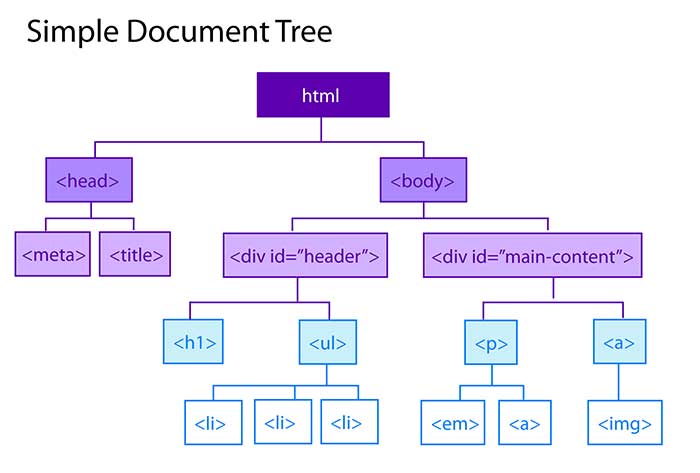
What does it mean?
- Ancestor --- The HTML tag that wraps around another tag is its ancestor. So, the HTML tag is an ancestor of ALL other tags
- Descendant --- A tag inside one or more tags is a descendent. So, the body tag is a descendent of the html tag, while the div id header is a descendent of both the body and html tag.
- Parent --- A parent tag is the closest ancestor of another tag. In our example, the html tag is the parent of the head and body tags.
- Child --- A tag that's directly enclosed by another tag is a child. So the p and the "a" tag are children of the main content div, while the em tag is not. The "em" tag is a child of the "p" tag and the img tag is a child of the "a" tag.
- Siblings --- The children in the above example are siblings to each other! (whew)!!!
- A great resource to help you understand these selectors!
Pixels or ems???
Always remember, a pixels will always be a pixel. An em's size can change!
Additional properties and values declared in the body!
- Font size
- Font family
- Verdana, Geneva, sans-serif;
- Georgia, "Times New Roman", Times, serif
- "Arial Black", Gadget, sans-serif
- Font weight
- Line height
- Color
Additional work on our page!
Lets add some "ids," "classes." "strong tags," "em tags" and lets see the results!